MSF 入门从 search 开始
MSF 入门的方式(之一?)
起
我在过去的一部分时间学习过MSF,却一直感觉自己根本不会使用MSF这个工具,如果我需要某个功能该如何使用?如果没有教程,现在我需要使用某个功能,那么如何在海量的功能里面找到那一个自己需要的功能?
在昨天打内网靶场的时候,突然感觉自己拿到了 MSF 使用中最重要的一块拼图: search ,突然就可以较为轻松的使用 MSF 了……我认为 serach 才是 MSF 真正入门的方式(之一?)
始
官网的一个入门例子
那么开始,入门一个工具,最快的方式是到它的官网看看有没有 demo ,可以看看 入门 ,官网给出的示例如下:
msf > search type:auxiliary http html title tag

Matching Modules
================

   #  Name                          Disclosure Date  Rank    Check  Description
   -  ----                          ---------------  ----    -----  -----------
   0  auxiliary/scanner/http/title                   normal  No     HTTP HTML Title Tag Content Grabber
这个官网的入门,实际上就使用了 search 进行查找,不过这个官网是使用 search 搜索了搜索模块的描述(Description)部分,从而找到了 auxiliary/scanner/http/title 模块路径,这个时候可以使用 use 0 和 use auxiliary/scanner/http/title 来使用模块,接下来就是查看当前可以配置的内容,以及 run 了
这一套流程下来就是
- 搜索需要的模块或功能关键字
- 加载模块
- 配置模块
- run
经典例子 ms17-010
上面是官网的例子,那么我再举一个例子吧,使用 ms17-010 (经典010)
首先,在信息收集过程中,发现了某个主机开放了 139 和 445 端口,那么有经验的同学就会想到永恒之蓝(EternalBlue),或者 MS17-010,通过这个就能搜索到 永恒之蓝的辅助或者利用模块,如下
msf > search EternalBlue

Matching Modules
================

   #   Name                                           Disclosure Date  Rank     Check  Description
   -   ----                                           ---------------  ----     -----  -----------
   0   exploit/windows/smb/ms17_010_eternalblue       2017-03-14       average  Yes    MS17-010 EternalBlue SMB Remote Windows Kernel Pool Corruption
   1     \_ target: Automatic Target                  .                .        .      .
   2     \_ target: Windows 7                         .                .        .      .
   3     \_ target: Windows Embedded Standard 7       .                .        .      .
   4     \_ target: Windows Server 2008 R2            .                .        .      .
   5     \_ target: Windows 8                         .                .        .      .
   6     \_ target: Windows 8.1                       .                .        .      .
   7     \_ target: Windows Server 2012               .                .        .      .
   8     \_ target: Windows 10 Pro                    .                .        .      .
   9     \_ target: Windows 10 Enterprise Evaluation  .                .        .      .

--- 略 ---
好,到此先停一下,现在我们会有一些疑问,比如, exploit/windows/smb/ms17_010_eternalblue 每个目录代表什么?如何确定我们需要使用哪一个?列出来的每一列代表什么?那么可以开始下面的内容了。
理解基础结构
这个是不可缺少的一环,如果要理解如何使用 MSF ,至少要看懂目前显示的内容,在使用 search 进行搜索之后,显示到终端的内容
首先我们来到 msf 的 modules 目录,以下是 kali 中 msf 的 modules 文件位置
┌──(root㉿kali)-[~]
└─# cd /usr/share/metasploit-framework/modules

┌──(root㉿kali)-[/usr/share/metasploit-framework/modules]
└─# ls -lh
total 32K
drwxr-xr-x 21 root root 4.0K Jun 18 03:04 auxiliary
drwxr-xr-x 12 root root 4.0K Jun 18 03:04 encoders
drwxr-xr-x  4 root root 4.0K Jun 18 03:04 evasion
drwxr-xr-x 21 root root 4.0K Jun 18 03:04 exploits
drwxr-xr-x 15 root root 4.0K Jun 18 03:04 nops
drwxr-xr-x  6 root root 4.0K Jun 18 03:04 payloads
drwxr-xr-x 14 root root 4.0K Jun 18 03:04 post
-rw-r--r--  1 root root  434 Feb 26 10:14 README.md

┌──(root㉿kali)-[/usr/share/metasploit-framework/modules]
└─# cat README.md
This is the folder where all of Metasploit's modules live. These modules are scripts in Ruby that interface with
Metasploit itself to perform some specific task. There are various types of modules, such as `exploit` modules to
exploit a vulnerability and gain a shell, `auxiliary` to perform a non-shell gaining activity, `payloads` for
Metasploit's various payloads (which are also modules), and `post` for post exploitation modules.
这里列出了 MSF 的各个模块,当前目录下也有 README.md 文件进行说明( README.md 文件没有的以下也说明功能)
auxiliary模块用于执行非 shell 获取操作,用于辅助操作encoders对 payload 进行编码,目的是绕过杀毒软件(AV)或 IDS/IPS 的检测evasion专门用于生成绕过杀毒软件检测的攻击载荷exploit模块用于利用漏洞并获取 shellnops生成 NOP 指令(空操作指令,如 x86 的 0x90)payloads模块用于存放 Metasploit 的各种有效载荷(这些有效载荷也是模块)post模块用于后渗透攻击
那么回到样例 1(这里使用截图,复制的内容看不到高亮,且没使用 type:auxiliary 参数,这是可选的)
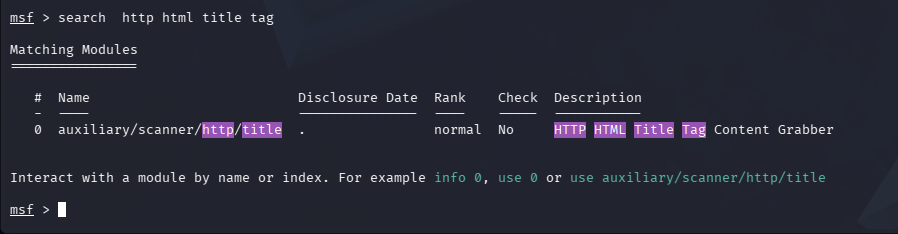
这是想要使用网站 title 的搜索模块,然后使用 search 搜索了关键字 http html title tag ,刚好命中 Description,从 Name 部分来看,这个是一个 辅助模块(auxiliary) ,是一个 扫描器(scanner) ,使用http 协议 , 功能 是请求取 <title> 标签
那么开始解释回显的内容
# – 序号
这里是列出来的内容的序号,从 0 开始,可以在 search 查询之后直接使用 use number 进行模块的加载
Name – 模块完整路径
这里是 search 匹配到的模块的完整路径,可以使用 use 0 ,也可以使用 auxiliary/scanner/http/title 加载模块
它的命名规则可以以后再了解,本文主要是入门使用
Disclosure Date – 漏洞公开日期
只有 exploit 模块(漏洞利用)才有具体日期,例如 2017-03-14
其他的模块都是 . 或 blank
Check – 是否支持检测(check 命令)
如果这里是 YES 那么支持在模块加载配置之后执行一个 check 命令进行检测,而不是直接利用
Description – 简要描述
一句话说明这个模块的功能
search 的参数
在前面官网的入门例子里面,search 用了一个 type:auxiliary 参数
在 MSF 里面输入 search 可以看到帮助内容,里面就有 type 参数,用于限定模块类型
入门可以不使用任何限定参数,仅靠关键字叠加即可正常使用
接下来
创建自己的笔记文件,用于记录一些常用的模块,比如监听器 use exploit/multi/handler ,适合记录到自己的笔记里面,也可以写入到一个 .rc 文件里面作为一个 msf 脚本使用,比如以下 handler.rc 文件内容,就是启动一个监听器
use exploit/multi/handler
set PAYLOAD linux/x64/meterpreter/reverse_tcp
set LHOST 192.168.204.129
set LPORT 4444
exploit -j
执行方式如下
msfconsole -r handler.rc可以把一些执行过程收集起来,简化操作
End